Introduction to Python and the Course Environment
This session introduces Python and the environment you will be working in for the rest of the term.
It begins with what Python is and why it became the default language of analytics and data science — readable syntax, an interactive workflow, and a large ecosystem of data libraries — and then builds the mental model underneath that experience: an interpreter that evaluates one expression at a time, in a read-evaluate-print cycle that is what makes a notebook feel conversational. From there comes the distinction that shapes the whole course, between a notebook (an ordered collection of cells with saved output, meant for exploration) and a script (a file executed start to finish, meant for repeatable work), and why the course starts with the former and moves deliberately toward the latter. Variables are introduced as names bound to values rather than boxes holding them, along with the idea that clear naming is part of correctness rather than decoration.
The hands-on half covers course logistics, tools, and the submission workflow, then turns to Jupyter itself: creating a notebook, the difference between code cells and markdown cells, how execution order and the execution counter reveal the notebook’s hidden state, and how print differs from the automatic display of a cell’s last expression. The in-class activity is a guided notebook combining arithmetic, strings, and variable assignment, saved and named according to the course convention; the homework is notebook setup and basic Python expressions.
Listen
| Speaker | Text |
|---|---|
| Alex | Right now you are probably uh holding a piece of glass that can access the sum total of human knowledge in like milliseconds, |
| Sam | and it feels completely seamless, |
| Alex | right? It feels almost like magic, but you know the second you step behind that glass, the moment you decide you want to build an AI model or say write a script yourself, you realize something truly terrifying |
| Sam | that computers are actually incredibly stupid. |
| Alex | Yes, exactly. They only do exactly what you tell them. Nothing more. Welcome to this deep dive. Today we are talking directly to you, especially if you’re a graduate student stepping into the fast-paced world of data science, analytics, or, you know, artificial intelligence, |
| Sam | right, because you’re likely staring down your first real programming course, right? Working with this foundational set of lecture notes designed to teach Python programming. Exactly. |
| Alex | And uh our mission today is to explore exactly what it takes to cross that threshold because teaching this stuff or even just learning it for the first time, it’s a huge leap. |
| Sam | It’s a crucial threshold to cross, really, because the overarching goal of these lecture notes isn’t just about You know, memorizing syntax or learning to type code, it’s a fundamental shift in identity. It’s about moving your mindset from being a passive user of technology to becoming an active creator. |
| Alex | Oh, I like that active creator. |
| Sam | Yeah, but to do that, you have to break down that illusion of magic we were just talking about. You have to understand how the machine actually processes information. OK, |
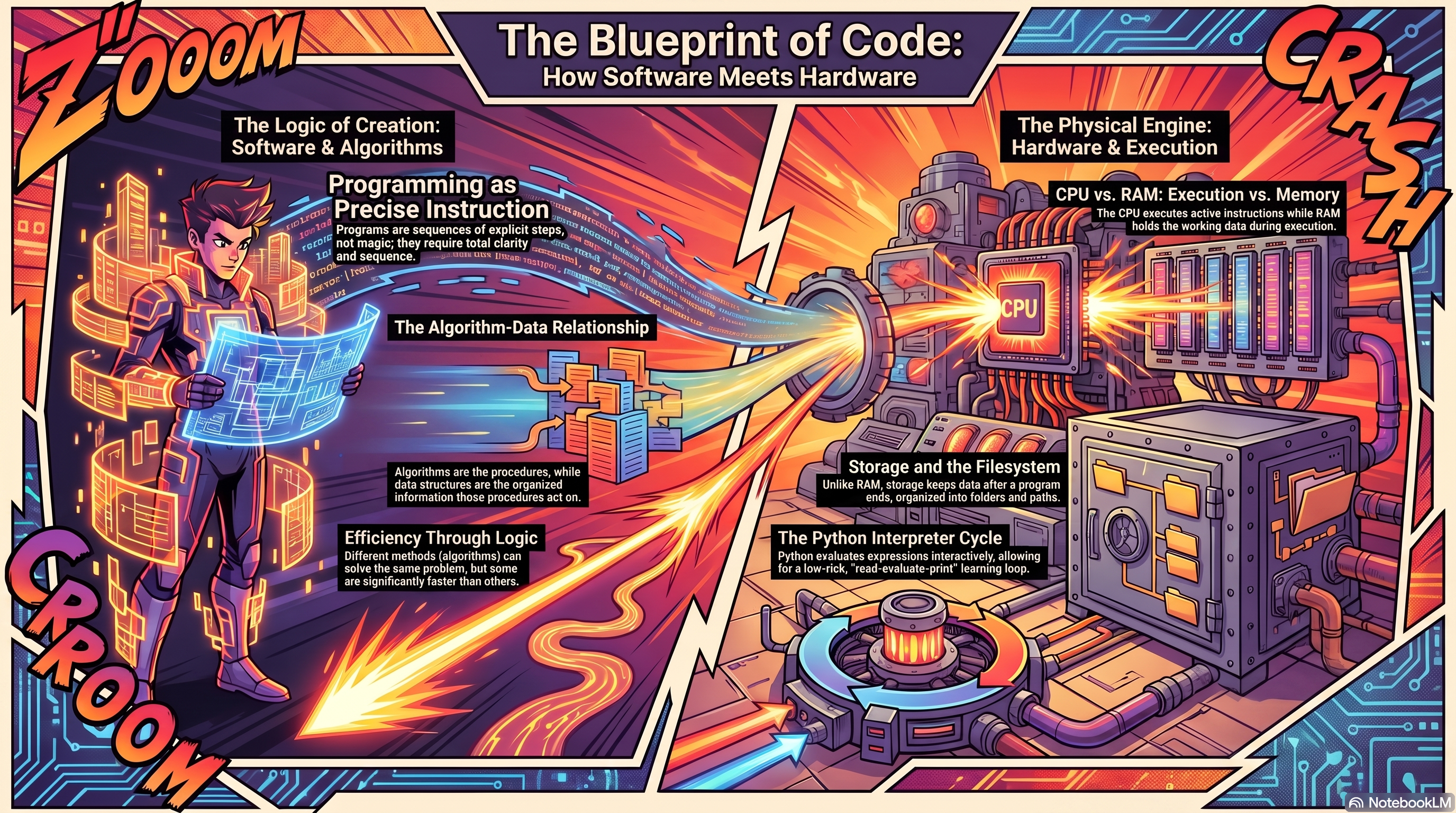
| Alex | let’s unpack this because that starts with understanding what a program fundamentally is. Before you can write a single line of Python, you have to understand the nature of the machine you’re talking to. The notes say a program is a sequence of explicit, precise steps. |
| Sam | But honestly, I mean, I think people hear that and still assume the computer has some baseline level of common sense, |
| Alex | which is, uh, the first major trap. A program is not a thinking entity. It has absolutely no intuition. It doesn’t know what you’re trying to achieve at all. |
| Sam | It’s just following orders. Exactly. Computers are incredibly fast and they are relentlessly obedient. But they require absolute clarity. I mean, they do exactly what they are told, not what we meant for them to do, |
| Alex | which brings up algorithms. So the notes define an algorithm as a step by step method for solving a problem, and they use these everyday examples like making a cup of tea or deciding what to wear based on the weather or finding |
| Sam | a name in a list. |
| Alex | Yeah, yeah. But usually when people teach this, they compare an algorithm to a recipe like baking a cake. But I, I don’t really love that analogy. No, why not? Well, wait. A human reading recipe can infer missing steps, right? Like knowing to turn on the oven, but a computer following an algorithm would just stare at the raw ingredients forever if you didn’t explicitly instruct it to turn the knob. |
| Sam | That is the perfect distinction to make, that aggressive literalness is usually the very first major hurdle for new programmers. It really is. You have this brilliant idea in your head. You write what you think is a clear set of instructions, and the computer just completely crashes. Or worse, it confidently gives you the wrong answer, |
| Alex | and your first instinct is always like, oh, the computer’s broken, |
| Sam | right? But it isn’t. It followed your instructions flawlessly. Your instructions were just, you know, incomplete. |
| Alex | It’s like Amelia Bedelia. Wait, who? Amelia Bedelia, that old children’s book character who took everything literally. You tell her to draw the drapes and she gets out a sketch pad and a pencil. |
| Sam | Yes, precisely. And in data science, being that literal means the specific way you write those instructions becomes critical because if you are going to be that explicit, you have to be efficient, efficiency, right. The lecture notes point out that two different programs can solve the exact same problem, but different methods have vastly different speeds. |
| Alex | I want to dig into that actually, because when we’re talking about modern computers, they process what, billions of operations a second easily. Yeah. So does efficiency really matter that much for a beginner? |
| Sam | It matters immensely, especially in analytics where you might eventually work with millions of rows of data. OK. Let’s use the source’s example of finding a name in a list. Imagine a physical phone book. If your algorithm is, uh, start at page one, look at the first name, is it the one I want? No, move to the second name, |
| Alex | right? Just going line by line. |
| Sam | Exactly. That will eventually find the name. The algorithm is technically correct, but if the name you want is Zimmerman. You are going to be turning pages for days. |
| Alex | Oh wow. Yeah, that would be brutal. |
| Sam | Now compare that to a different algorithm. Say your instructions are, open the book to the exact middle. Is the name I’m looking for alphabetically before or after this page. OK, |
| Alex | I see where this is going. |
| Sam | If before, rip the book in half, throw away the second half and repeat the process. That’s |
| Alex | violent, but effective. |
| Sam | Right. You will find that name in a fraction of a second, even with millions of entries. Both algorithms solve the exact same problem, but one takes days and the other takes milliseconds. |
| Alex | OK, so I have this perfectly efficient, literal set of instructions, but if I try to apply those instructions to a giant unorganized pile of numbers, The computer’s still going to choke, isn’t it, because the instructions are only half the battle. |
| Sam | You’re hitting on the exact reason the notes transition into data structures right after algorithms, because algorithms don’t exist in a vacuum. They have to operate on something. The data, exactly. A data structure is simply a way of organizing data so it can be stored, accessed, and modified efficiently, like a spreadsheet. Sure, yeah. A table with rows and columns is a data structure. A simple to do list is a data structure. Even a dictionary where you look up a specific keyword to find its definition is another one. The crucial insight from the material is that algorithms and data structures are intrinsically linked. They’re a pair. You cannot have a highly efficient procedure if the organization of the information is just chaotic. |
| Alex | OK, I think I need a physical way to picture this. So if the algorithm is our hyper literal recipe for making a sandwich, the data structure would be how the kitchen itself is organized. |
| Sam | That’s a great way to look at it. Let’s follow that logic. How would a bad data structure impact your sandwich algorithm. Well, |
| Alex | if my sandwich making instructions are perfectly optimized, right, like step 1, get bread. Step 2, get peanut butter. Step 3, bread. But the layout of my kitchen is terrible. Like, say the fridge is out in the garage, the bread is hidden in a random drawer in the bathroom, and the knives are buried in the backyard. That sounds like a nightmare, right? Then my perfect algorithm is going to be incredibly slow. I mean, I’d spent all my time just running between the garage and the bathroom, |
| Sam | which is exactly what happens inside a computer. The exact same task can become easy or hard, depending entirely on how the data is arranged. So |
| Alex | the organization changes everything |
| Sam | completely. If you organize your data in a simple linear list when it should have been arranged in a highly connected web, your algorithms are going to struggle, just like running from the garage to the bathroom to make a sandwich. Makes sense. And when you move into AI, choosing the right data structure, whether it’s an array, a matrix, or a tree, is honestly half the battle. |
| Alex | Here’s where it gets really interesting because this all makes conceptual sense, right? But let’s talk about where this is physically happening. The hardware, yeah, the notes spend time on the actual hardware CPU, RAM, and storage. And I have to admit I always get RAM and storage confused. Aren’t they both just memory? Why do we need two different things? |
| Sam | It’s a very common point of confusion. And the notes address it because you really need a practical mental model of the computer’s physical parts to understand why your code behaves the way it does, |
| Alex | right? So we aren’t completely blind. |
| Sam | Exactly. You don’t need a degree in hardware engineering, but you need to know the environment. Think of it as a division of labor. The CPU, the central processing unit, is the active worker. It executes the literal instructions. It does the math, but the CPU needs the data instantly available to do its job. |
| Alex | So where does it keep the data it’s currently working on? |
| Sam | That’s where RAM comes in random access memory. RAM holds the working data during execution. It’s blazing fast, but it’s volatile, meaning, meaning if the power goes out or the program closes, the data in RAM vanishes instantly. It’s gone. Storage, on the other hand, like your hard drive or solid-state drive is where data lives long term. |
| Alex | So if I can try another analogy, then go for it. Is it accurate to think of RAM as my actual physical desk space where I’m actively working on papers and storage is the filing cabinet in the corner of the room? |
| Sam | Yes, that is spot on. The CPU is you sitting at the desk doing the reading and the math. The desk is your RAM and the filing cabinet is your storage. |
| Alex | Oh, I see. So if I open a massive data set to analyze it for this course, I’m basically taking a thick file from the cabinet and trying to spread it all out on my desk. |
| Sam | Exactly. And your desk has a limited physical size, right? So if your laptop has, say, 8 gigabytes of RAM, but you try to load a 10 gigabyte data set, what happens? |
| Alex | My desk runs out of space, papers spill all over the floor, and the computer crashes, |
| Sam | or it slows to an agonizing crawl because you have to keep walking back and forth to the filing cabinet to swap papers out. Oh, |
| Alex | that makes so much sense. |
| Sam | That’s why understanding hardware matters. It also explains a fundamental programming concept, the difference between a variable and a file, |
| Alex | right? Because when I assign a variable in my code, I’m basically just writing a quick note on a scrap of paper that is sitting on my desk in RAM. Yep. |
| Sam | And when you close the program, you sweep everything off the desk into the trash. If you want to keep that result for tomorrow, you have to write explicit code to take that scrap of paper. Paper format it properly, walk it over to the filing cabinet and put it in a specific folder. |
| Alex | file system. |
| Sam | Exactly. That is what the file system is for. Files live in long-term storage. Working variables live in RAM. |
| Alex | That distinction is so critical to explain to new students. I mean, I can’t tell you how many times I’ve lost work in the past because I assume the computer was just somehow, you know, remembering what I was doing. We’ve all been there, but unless I actively filed it away. It only existed on the desk. |
| Sam | Now we have to add one more layer to this hardware model because modern computing doesn’t happen in a silo. The internet, right? The notes explicitly mention networks. Your computer is connected to the world. Modern programs rarely run alone. They send and receive data via browsers, cloud storage, and APIs. |
| Alex | How does that fit into the desk analogy? |
| Sam | Well, when you write a Python script that requests data from a web API, your CPU is essentially picking up the phone on your desk, calling another computer’s filing cabinet halfway across the world, and asking it to fax over some documents directly onto your desk. |
| Alex | OK, and I imagine that fax takes time. |
| Sam | It does. Understanding. Network latency, the physical time it takes for those electrical signals to cross the ocean, helps demystify why a program might pause for 3 seconds. |
| Alex | Yeah, |
| Sam | it’s not frozen. Exactly. It’s not frozen. It’s just waiting for the facts to arrive. |
| Alex | OK, so we’ve mapped out the physical workspace. We’ve got the active worker at the desk pulling from the cabinet, occasionally making phone calls. How do we actually start talking to this worker? This brings us to the tool of choice for the course, Python. |
| Sam | Right. There are dozens of programming languages out there, but Python has absolutely taken over the world of data science, analytics, and AI. |
| Alex | Why is that? I mean, what makes Python so special for beginners? |
| Sam | The notes highlight a few key reasons. First, readability. The syntax-like, the grammar of the language, is designed to look remarkably like plain English. This means you spend less time fighting confusing brackets and semicolons and more time focusing on the actual logic of your algorithm, which is what |
| Alex | actually matters, right? |
| Sam | Second, it has a massive ecosystem. If you want to build a neural network or clean a data set, someone has already built a highly optimized tool for it in Python. But technically speaking, the biggest advantage for a beginner is that Python is an interpreted language. |
| Alex | Yeah, the notes mention this. They talk about the reevaluate print loop or REPL, but I’m not entirely clear on what that means mechanically. How is an interpreted language different from other languages? |
| Sam | Think of it like translation. In some older languages, compiled languages, you have to write your entire program first. Then you run a complex compiler that translates the whole thing into machine code all at once, all at once, yeah. And if there’s a single typo on page 50, the whole compilation fails and you can’t run anything. It’s like writing a whole book in English, handing it to a translator, and waiting weeks to see if they can even read it. |
| Alex | That sounds incredibly frustrating if you’re just trying to learn the basics. It |
| Sam | really is. Python being interpreted is more like having a real-time translator in your earpiece. It evaluates your code one single expression at a time. Oh, I see. It reads what you typed, evaluates the logic, and prints the result right back to you immediately. That’s the reevaluate print loop. |
| Alex | So I can just type 2 + 2, hit enter, and it says 4. I don’t have to build a whole software application just to see if my math works. |
| Sam | Exactly. It makes early learning incredibly interactive and low risk. You get instant feedback, and this mechanical difference is what allows for the two main ways you’ll write Python in this course notebooks and scripts. |
| Alex | The course explicitly transitions students from notebooks to scripts. Let’s break those down because I’ve seen Jupiter notebooks before. They look like web pages with little blocks of code, |
| Sam | right? Notebooks are built entirely around that REPL cycle. They organize code into interactive cells. Mechanically. What’s Happening is that the notebook keeps your ramp, your desk active and intact as long as it’s open. |
| Alex | Oh, |
| Sam | interesting. You can run cellblock 1, pull a data set onto your desk, look at a chart, write a paragraph explaining it, and then move to cellblock 2, and the data is still sitting on the desk. So it’s |
| Alex | an environment built for exploration. Like a digital lab notebook, I can try an experiment, look at the result, tweak it, and try again without having to reload the whole data set every single time. |
| Sam | Precisely. But a script is different. How so? A script is a plain text file containing Python code that is executed by the computer strictly from top to bottom all at once. When a script runs, it sets up the desk, does all the work, and then sweeps the desk entirely clean when it finishes. |
| Alex | So if notebooks are for discovery and exploration, scripts are for repeatable production work. Like, once I figure out the perfect algorithm in my notebook, I put it in a script so the computer can run it automatically every night. |
| Sam | That’s a great rule of thumb. Now, whether you are in a notebook or a script, the very first conceptual building block you will use in Python is a variable. And the lecture notes have a fascinating, very specific way of describing variables in Python that we really need to touch on. |
| Alex | Yes, I noticed this too. Usually when people teach programming, they say a variable is like a physical box. You put the number 5 into a box and you write the letter X on the outside of the box, but the notes specifically warn against that analogy. |
| Sam | They do. The notes state that in Python, variables should be thought of as names bound for values, not as physical boxes. |
| Alex | What’s the difference really? Why does it matter if I think of it as a box or a name? |
| Sam | It’s a subtle but powerful psychological shift. In Python, the value 5 just exists in the computer’s memory on its own. When you type X equals 5, you aren’t putting 5 into a box. What are you doing? You are taking a little sticky note with the letter X on it and slapping it onto the number 5, a sticky note. OK. Later you could take that X sticky note and put it on a word or a massive data table. The name is just a label pointing to the |
| Alex | data. OK, mechanically I get that, but the notes go further and emphasize the actual names we choose. I mean, if the computer just sees a sticky note, why does it care if I call my variable x or TM data or average monthly revenue? The computer doesn’t know English. |
| Sam | Because the computer doesn’t care. The computer will execute x equals y plus z just as flawlessly as it executes profit equals revenue minus expenses. The naming is not for the machine. The naming is for you and for the poor soul who has to read your code 6 months from now, which is almost always just future you. Wait, |
| Alex | so naming a variable isn’t just a technical requirement to make the code run. It’s actually a core part of writing correct code because it communicates human intent. |
| Sam | You’ve nailed it. Naming is part of correctness because it communicates your intent to a human reader. If you use vague names, you are fundamentally miscommunicating the purpose of your own logic. |
| Alex | It’s like writing a brilliant, incredibly efficient recipe, but calling all the ingredients ingredient A, ingredient B, and ingredient C. The chef writing it is going to be completely lost, even. If the math and the measurements technically work perfectly. |
| Sam | Exactly. Programming is a dual communication medium. You are simultaneously trying to give a hyper literal machine explicit instructions to execute while also telling a human reader a clear story about what you’re trying to accomplish. |
| Alex | Wow. We’ve covered some serious ground today. It feels like we’ve completely deconstructed that magic piece of glowing glass we talked about at the beginning. |
| Sam | Certainly peeked at the gears turning behind |
| Alex | it. We started by realizing the computers aren’t smart. They’re just aggressively literal, which means our algorithms have to be explicit and highly efficient. We saw how a perfect algorithm will still fail if our data structures like the layout of our kitchen are a mess. We mapped out the physical desk space of RAM versus the deep filing cabinets of storage and the faxes and the faxes, right, the network latency, and we explored how Python’s interactive REPL cycle makes it the perfect language for data exploration, right down to the philosophy of using variables as sticky notes to clearly communicate human intent. |
| Sam | It’s a lot to take in, but it’s the foundation of everything that comes next. |
| Alex | So what does this all mean for you? Well, |
| Sam | I think it leaves us with a fascinating paradox to mull over. We’ve established that a computer is a machine that does exactly what it is told, not what we meant, and we’ve learned that naming variables and structuring data is entirely about communicating our intent. Therefore, as you embark on learning Python for data science and AI, I want you to consider this. Is learning to program actually less about memorizing a machine’s arcane syntax and more about forcing yourself, perhaps for the very first time in your life, to think and communicate your own human logic with absolute flawless clarity? |
| Alex | Because when you finally learn to communicate that clearly, the glass screen stops being a barrier and starts being a canvas. Until next time. |
Presentation
- Introduction to Computing and Programming - Overview of the functional components of computers and fundumentals of programming languages