Types, Strings, and Conditionals
This session introduces Python as a language with its own syntax and conventions, establishing the habits of readable, consistent code before any complexity is added.
It then turns to variables and objects: a name refers to an object, every object has a type, and that type determines which operations are meaningful. Working through the core scalar types, students see why some combinations of values work and others raise errors, why explicit conversion is preferable to relying on implicit behavior, and where the common early pitfalls lie in numeric precision and in values that only appear to be what they seem. Comparison and boolean logic follow as the means of expressing a decision, leading to branching as a control structure in which exactly one path runs and ordering carries meaning.
The practical half builds outward from small, self-contained tasks toward larger programs assembled from reusable pieces. Students work with text and numeric data, format output for readability, and treat errors and tracebacks as information to be read rather than failures to be avoided. Conditional logic is developed incrementally, tracing how a given input moves through a program, and short working fragments are then combined so that composition becomes visible early. The session closes with a hands-on exercise in which students apply each of these aspects together on simple inputs, including cases that are empty or malformed.
Listen
| Speaker | Text |
|---|---|
| Alex | So usually when you step into a graduate research program, um, there is this unspoken expectation that you just sort of figure out your computational tools as you go. Like you are standing at the edge of this dense pathless jungle of data and someone just hands you a tiny pocket knife and says, Well, good luck. See you at the dissertation, right? And |
| Sam | that pocket knife is usually Like a basic spreadsheet program and the jungle you are facing is a million rows of messy, unstructured survey results. I mean, it is the absolute definition of being mathematically stranded. Exactly. |
| Alex | But instead of that pocket knife, Wes McKinney’s Blueprints for Python, uh, they hand you a bulldozer. Suddenly you can build a paved highway right through that data jungle. |
| Sam | Yeah, that’s a great way to put it. |
| Alex | So today we are looking at those blueprints. We’re pulling directly from McKinney’s highly regarded book, Python for Data Analysis, and we’re really zeroing in on the language basics and the built-in data structures. So we are talking directly to you, the graduate student who is just stepping into the world of computer programming. |
| Sam | And our mission for this deep dive is to demystify programming by focusing on a core concept. We want to look at how to break down massively complex tasks into elementary manageable steps. We’ll explore the underlying logic of Python, explaining not just, you know, what the language does, but why it operates the way it does, which is so important. It is because understanding that why is crucial for building a really strong foundation in computational thinking, right? |
| Alex | So before we can write complex programs to solve those world-changing research questions, we first need to understand how the computer actually reads our instructions. The source text describes Python as an interpreted language. How does that actually differ from, you know, other ways a computer reads |
| Sam | code? Well, in some languages, um, like C++ or Java, you write your code and then you use a compiler. Now the compiler translates your entire program into machine code all at once. Bin a curtain, basically, and only then does the computer run it. So it’s an all or nothing thing. Exactly. But Python does not do that. The Python interpreter reads and executes your program one single statement at a time. Huh. |
| Alex | That sounds like it changes the way you actually work with the code on a day to day basis. |
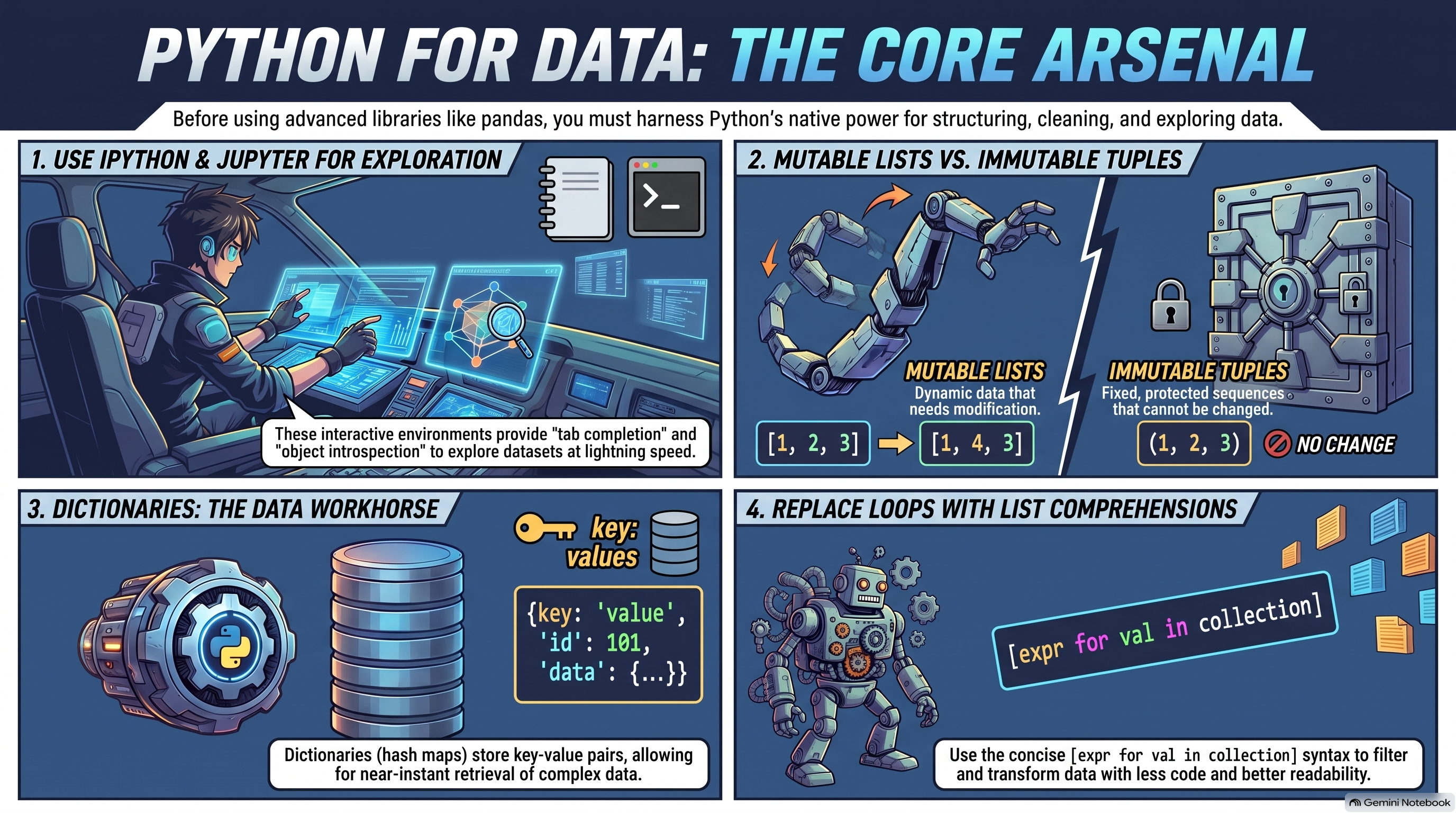
| Sam | Oh, it fundamentally changes the workflow because it reads line by line. Python is incredibly interactive. You can use environments like IPython or Jupiter notebooks. These are, um, web-based interactive documents where you can write a single chunk of code, execute just that chunk, and immediately see the |
| Alex | output or like a data visualization right |
| Sam | below it, yeah, right below it for a researcher doing data exploration, that immediate line by line feedback loop is just invaluable. You aren’t. For a massive program to compile just to see if your math was right on step two, right? |
| Alex | That would be so frustrating. And looking at the code itself, it actually looks surprisingly readable. I mean, the author notes that Python is often likened to executable pseudocode. Yeah, |
| Sam | Python’s design philosophy heavily emphasizes readability and simplicity, going back to languages like C++ or Java. Developers have to use curly braces to define blocks of code. Oh, I’ve seen that, yeah, and they have to end every single line with a semicolon. It looks so messy. It does. Python gets rid of all that visual clutter. It uses significant white space, meaning tabs or spaces, specifically indentation to structure the code, so no brackets everywhere, exactly. A colon denotes the start of a block, and everything indented under it is part of that block. |
| Alex | So it forces you to write code that looks clean on the screen. Yes, |
| Sam | exactly. |
| Alex | But under that clean hood, there is a very specific way Python handles the data itself. The book really emphasizes this core concept. Everything is an object. I’m trying to wrap my head around what that means in a practical sense. |
| Sam | So think of the consistency of Python’s object model. Every number, string, data structure. Um, even a function itself exists in the Python interpreter inside its own internal box. We call that box a Python object, and every single object has an associated type like integer or string. And its own internal data. OK, |
| Alex | so if everything is a box, how do we label them? In my limited experience with other languages, um, when you assign a variable, you are essentially creating a new box and putting data inside it, right? Right. But |
| Sam | Python uses a completely different semantic. Python variables are just references. They are bound names. |
| Alex | Wait, really? |
| Sam | Yeah, assigning a variable does not copy the data or create a new box. OK, let’s |
| Alex | unpack this. Uh, let me test an analogy on you to see if I have this right. Go for it. Variables in Python aren’t like creating new physical boxes for your data. They are more like putting sticky notes on the exact same physical box. Oh, I like that. Like if I I have a box of data and I stick a yellow note on it that says A and then I create a new variable B and set it equal to a. I haven’t copied the box. I’ve just written B on a blue sticky note and slapped it onto that exact same box |
| Sam | that captures the reference model perfectly, really, yeah, because if you reach into that box and add something new to it, both sticky note A and sticky note B are still pointing to that same. Now altered box. If you don’t deeply understand this reference semantic, you can easily end up modifying data you didn’t mean to modify, |
| Alex | which is a nightmare for a graduate student running an experiment. I mean, you absolutely do not want to accidentally overwrite your control group data just because you didn’t realize two variables were pointing to the same object. |
| Sam | Exactly. And while we are talking about how Python handles these objects, we really must address types. Because variables are just sticky notes, they do not have an inherent type. |
| Alex | OK, so the sticky note doesn’t care what it’s attached to, |
| Sam | right? The object, the box itself has the type. Python is what we call strongly typed, |
| Alex | meaning, um, it won’t try to automatically. fix things if I mix up my data types. |
| Sam | Correct. If you take the number 5 as an integer object and you try to add it to the string character 5, literally the text symbol of a 5 python will throw a type error. It just crashes. It completely halts and tells you it cannot concatenate. A string and an integer, it will not implicitly guess what you want. So no trying to be helpful, right? It will not turn them both into strings and give you 55, and it will not turn them both into numbers and give you |
| Alex | 10. I mean, it forces you to be explicit. It’s almost protecting me from my own sloppy typing, you know, preventing those quiet disastrous errors that could completely invalidate a data analysis. Absolutely. So we know how Python reads instructions and labels data, but to actually solve a problem, we have to structure that data and direct the flow of those instructions. We need containers and we need traffic cops. |
| Sam | Let’s focus on those containers first. Python has a few built-in sequence types that serve as the workhorses for data analysis. The primary one is the list. OK, the list. You create a list using square brackets. Lists are variable length and mutable, meaning you can add items, remove items, and alter the items inside them in place. |
| Alex | So |
| Sam | they’re |
| Alex | extremely flexible, |
| Sam | very flexible. Then you have tuples, you create tuples with parentheses, or often just by separating values with commas, but tuples are fixed length and immutable, immutable meaning. |
| Alex | They can’t change. |
| Sam | Right. Once you create a tipple, you cannot change which object is stored in each of its slots. |
| Alex | OK, here’s where I get confused. If lists are so incredibly flexible, allowing you to append, insert, and pop things out, why would I ever want to use a tupple? Like why intentionally limit what I can do with my data? |
| Sam | What’s fascinating here is it comes down to safety and speed. Let’s tackle the safety of immutability first. When you use a tupple, you are guaranteeing that the structure of that data will not change throughout your program. This prevents unwanted side effects. |
| Alex | Ah, so like the sticky note problem we talked about earlier. |
| Sam | Exactly. If you pass a tupple full of crucial configuration settings into a function, you can rest easy knowing the function cannot accidentally add or remove elements from it. It is locked in. |
| Alex | It is another safeguard against my own future mistakes. |
| Sam | Exactly. Then we have the dictionary or dict. Which uses curly braces. In other languages, this is often called a hash map. A dictionary stores key value pairs. Instead of looking up an item by its numerical sequence index like you would in a list, you look it up by a unique key. |
| Alex | And how does that relate to speed? You mentioned speed before. Well, |
| Sam | if you have a List of a million items and you want to check if a specific value is in there. Python has to do a linear scan. It checks item 1, then item 2, then item 3, all the way down the line. That sounds slow. It takes a significant amount of computational time, but a dictionary uses a hash table. When you want to look up a key, Python runs a mathematical formula on that key to instantly calculate exactly where the value is stored in memory. Oh wow. It checks for keys in constant time, making dictionaries infinitely faster than scanning a massive list item by item. |
| Alex | That sounds incredibly powerful for large data sets, but I’m guessing there’s a catch regarding what can actually be used as a key. There |
| Sam | is. To be a key in a dictionary, the object must be immutable. You can use a string, a number, or a tuple. You absolutely cannot use a list as a dictionary key. Wait, |
| Alex | why not? If everything is just an object in a box, why does the dictionary care if the box is a list or a tuple? |
| Sam | Because of that mathematical formula we just mentioned, the hash formula calculates a memory location based on the exact contents of the key. Oh, I see where this is going. Right. If you use a list as a key and then later you append a new item to that list, the contents change. The hash formula would produce a completely different result, and Python would instantly lose track of where the value is stored. |
| Alex | That would be bad, |
| Sam | very bad. Immutability ensures the key remains constant forever. |
| Alex | Ah, so tuples are practically required if I want to use a complex sequence of items as a fast lookup key in a dictionary. That makes perfect sense. So those are our containers. How do we direct the traffic between them? |
| Sam | We use control flow to break a massive problem down into elementary steps. A 4 loop lets you iterate over a collection, like our lists or ts, performing an action on every single item sequentially, |
| Alex | OK, making it do a step over and over, right? |
| Sam | And a while loop keeps executing a block of code continuously as long as a specific condition evaluates the true. And then if EFF and E’s statements let you branch your logic based on specific conditions, |
| Alex | do we get any of that elegant pseudocode syntax here? Oh, |
| Sam | Python offers fantastic syntax for handling these structures. Take tuple unpacking, for example. If you have a tuple containing 3 values, you don’t have to extract them one by one. |
| Alex | How does that |
| Sam | work? You simply write A, B, C equals my tuple. And Python neatly unpacks those values into 3 separate variables in a single line. Oh nice. You can even use this trick to swap variables instantly. You just write A B equals BA. No need to create a temporary placeholder variable like you do in older programming languages. |
| Alex | That is really clean. And the book mentions something called duck typing when iterating over these containers. What does that actually mean? Well, |
| Sam | the phrase comes from the old saying, if it walks like a duck and quacks like a duck, it’s a duck. In practice, Python often does not care about the strict type of an object, only if it has certain methods or behaviors. If you ride a for loop. Python doesn’t check the object’s ID card to see if it is strictly a list or strictly a couple. What does it check then? It just checks if the object implements the iterator protocol. |
| Alex | Hold on, iterator protocol sounds like a sci-fi treaty. What is Python actually checking for? |
| Sam | It is simply asking the object, Can I ask you for your items one at a time? If the object says yes, Python processes it. It focuses entirely on what the object can do rather than what the object strictly is. This makes writing generic flexible code much easier. |
| Alex | So we have these basic step by step instructions and loops, but um if I am running this analysis on 50 different data sets, I really Do not want to retype those loops 50 times. Writing a procedure once is great, but to build higher level programs, we have to learn reusability. |
| Sam | Absolutely. This is the transition from writing a quick script to engineering a robust solution. Functions are the primary method of code organization and reuse in Python. You declare them using the D keyword. |
| Alex | I think of this like playing with Lego blocks. You don’t start by trying to mold a massive complex plastic spaceship out of raw materials. You start with low level, simple procedures, a single Lego block. Then you combine those blocks dynamically to build a higher level, highly specific solution. |
| Sam | Exactly. You define a function to perform a very specific task, and you pass it arguments to make that task general. You might write one small function that calculates a statistical mean. Another that filters out missing data and another that formats a chart. And notably, Python functions can return multiple values at once. Under the hood, it is actually just returning a single tuple and unpacking it, but it feels like returning multiple distinct answers. |
| Alex | The book also mentions name spaces or scope when talking about functions. It says variables created inside a function are local. |
| Sam | Yes, when you create variables inside a function, they belong exclusively to that function’s local namespace. Once the function finishes running and returns its result, That local name space is destroyed. So the |
| Alex | variables just vanish. That seems confusing. Why wouldn’t I want to keep the data I just worked on? |
| Sam | Think of a name space like a temporary whiteboard in a meeting room. The function is the meeting. You go in, you write a bunch of calculations on the whiteboard, and you arrive at a final decision, your return value. When the meeting is over, you walk out with a final decision, and the janitor immediately wipes the whiteboard completely clean. |
| Alex | Leaving the room ready for the next meeting, that actually makes sense. It keeps the workspace clean, so I don’t have thousands of temporary variables clogging up my computer’s memory. Let’s look at a concrete example from the source text that ties all this functional Lego block building together. The book talks about cleaning messy survey data. |
| Sam | Oh, anyone who has done real world research knows this pain. You receive a list of strings representing states, but the participants have typed them in erratically. You have Alabama with huge spaces around it, Georgia with an exclamation point, and Georgia entirely in lowercase. To |
| Alex | clean this, my instinct would be to write a giant messy loop with a dozen if statements checking for every possible error, |
| Sam | and that’s what a lot of beginners do. But the book suggests a much more functional pattern. You create simple Lego blocks. You utilize a built-in method like str. strip to remove white space. You write a tiny dedicated function to remove punctuation using regular expressions, and you use scar.title to capitalize the first letter. |
| Alex | And because Python treats everything as an object, those functions themselves are objects, right? Like I can put the functions into a list. |
| Sam | Exactly. You create a list called cleanups containing your 3 specific operations. Then you write a generic clean strings function. It takes your messy data. And it takes your list of operations. Oh, I see. It loops through the data, and for every string, it loops through your functions, applying them one by one. It |
| Alex | forces |
| Sam | you |
| Alex | to think modularly. If you suddenly realize you also need to remove numbers from the survey data, you don’t have to rewrite your entire program or mess with a fragile loop. You just snap a new Lego block function into your cleanups list. |
| Sam | Treating functions as objects allows for incredibly concise, adaptable code. You can use the built-in map function to apply an operation to entire sequence instantly, or you can use anonymous lambda functions, which are tiny single line functions created on the fly. Oh, lambda functions, yeah, to pass custom sorting logic into an algorithm without having to formally define a whole new function block. |
| Alex | While we are on the topic of concise code, I want to ask about comprehensions. List comprehensions, dictionary comprehensions. The text emphasizes them heavily. Oh, |
| Sam | comprehensions are a beloved Python feature. They allow you to concisely form a new collection by filtering and transforming data in a single highly readable line. Like how? Let’s see you want to filter out strings that are too short and convert the rest to uppercase. Instead of writing a four-line four loop, you write it in one bracketed expression, x. upper for X in strings if lend x2. |
| Alex | I can literally translate that into an English sentence. Give me X uppercase for every X in the strings list if the length of X is greater than 2. It is that executable Sao code in action again. But is it just about saving a few keystrokes? |
| Sam | No, it goes deeper than readability. Comprehensions are heavily optimized under the hood in C, which is the language Python itself is written in. Running a comprehension is frequently much faster than running a traditional four loop with an append statement inside it. You get cleaner code that also performs better. |
| Alex | So our data pipeline is now modular, fast, and pristine. But it is living in a vacuum. What happens when we unleash this perfect logic on the real world? Things get messy, right? We have to read files off a hard drive, handle unexpected errors without our program exploding, and manage computer memory when dealing with massive data sets. |
| Sam | Well, dealing with files is straightforward in Python. You use the built-in open function. By default, it opens files in text mode, meaning it expects string characters. The book specifically notes we should almost always pass encoding OTF 8. Because default encodings vary wildly depending on whether you are working on a Mac or a Windows machine. |
| Alex | And once I open a file, I have to close it, right? Otherwise I’m just leaving programs running in the background and draining my operating system’s resources. |
| Sam | Yes. But closing files manually can be risky if an error occurs before you reach the close command. The safest way is using a with block, a block, yeah. If you type with open. SF, Python will automatically and safely close the file the exact moment you are done indenting that block of code. Even as an error completely crashes your program in the middle of reading the file, the with block ensures the file is safely closed on the way down. |
| Alex | Let’s talk about those crashes. Your code is going to encounter bad data. The text uses the float function as an example, which tries to cast a string into a decimal number. If you pass it the string 1.23, it works. But what if a survey participant typed the word something instead of a number? |
| Sam | If you run float something, Python will raise a value error and stop your entire program dead in its tracks. Oh man. And if that happens on row 900,000 of a million row data set. You lose all your progress. How do we build resilience against that? We use a try and accept block. You place the code that might fail inside the tri-block, then you write, accept value error. This tells Python, if you hit this specific error, do not crash. Instead, run this alternative code. That’s super useful. It really is. You can catch the error, log it, or perhaps just gracefully return the original messy string, allowing your program to shrug off the bad data and continue processing the rest of the millions of. |
| Alex | Rows. OK, so we are safely opening files and we are catching the errors. But what if the file we open is absolutely massive? Like if I try to read a billion row text file into a standard Python list, my computer is going to run out of RAM and completely freeze. |
| Sam | This is where generators become essential. Earlier we discussed functions that use the return keyword to give back a result. A generator is a function that uses the yield keyword instead. |
| Alex | Wait, how does yield change the behavior of the function? |
| Sam | When a normal function hits a return, it calculates the entire data set, hands over the whole massive result, and shuts down. When a generator hits yield, it pauses its execution. |
| Alex | It |
| Sam | pauses, |
| Alex | yeah, |
| Sam | it produces a single value, hands it to you, and waits. The next time you ask it for a value, it wakes up, picks up exactly where it left off, and yields the next single value. |
| Alex | Here’s where it gets really interesting. Does producing one value at a time actually save a noticeable amount of memory compared to just returning a regular list? |
| Sam | If we connect this to the bigger picture, it is the difference between a task being possible and impossible because the generator produces elements one at a time. It only ever holds one item in memory at any given moment. You could iterate over a data set that is terabytes in size, far larger than your computer’s RAM. If you used a list, Python would try to load all those terabytes into memory simultaneously and crash immediately. With the generator, it just sips the data one row at a time. |
| Alex | So a graduate student could build a robust data pipeline using generator expressions, piping massive amounts of data through those Lego block functions, catching errors gracefully as they happen, and never overwhelm their laptop’s hardware. |
| Sam | Exactly. That is the essence of array-oriented computing and robust data processing in Python. You break the massive problem into elementary reusable steps and manage the flow of data intelligently. |
| Alex | We have covered incredible ground today. We started by understanding how the Python interpreter reads line by line and how it labels data objects with references or sticky notes. |
| Sam | We examined how to structure data using lists, couples, and dictionaries. And how to direct traffic with loops and conditionals relying on the safety of immutability and the speed of hash tables. |
| Alex | We learned how to encapsulate those elementary steps into reusable functional Lego blocks, leveraging names, spaces, and comprehensions. And finally, we made our programs resilient, opening files safely, catching exceptions, and using generators to conquer data sets larger than our own hardware limits. |
| Sam | Before we wrap up, consider this. If programming is ultimately about breaking down massive ambiguous problems, Into tiny logical reusable steps. How might learning to code actually rewire your brain? |
| Alex | Think about that as you start writing your own scripts. Once you train your mind to identify the elementary steps in a Python program, how will that change the way you decipher the non-technical everyday problems in your research or even in your life? Because suddenly that dense, pathless jungle of data doesn’t look so intimidating. You’ve traded in the pocket knife. Now you have the blueprints to build the bulldozer, catch you on the next deep dive. |
Read
Hands-on
Notebooks in 02-Types-Strings-Conditionals
References
- The Python Language Reference
- The Python Standard Library
- Built-in Functions
- Built-in Types
- Common string operations
- File and Directory Access
Special CLI Commands
You find special commands the cluster’s (ARC) command line interface (CLI). You can type them in the terminal.
DO NOT TYPE
$(It’s shown to indicate that you enter the command after the promopt, usually$)
Activate Python Environment
$ source conda-env
WHile notebooks have an option to select your Python environment, running Python programs from the CLI rquires you to set an environment in the shell.
Download Class Examples
On the command line, navigate to the directory where you want to download the examples. Then type
$ ifi8460-download
Then enter the number of the session.
To get help:
$ ifi8460-download --help
ifi8460-download -- download an IFI8460 session folder from GitHub.

Usage:
  ifi8460-download [OPTIONS] [SESSION]

SESSION may be given as a number (1 or 01) or as the full folder name
(01-Intro-Unix).  Without SESSION the available sessions are listed and one is
asked for interactively; q or exit quits.

Options:
  -l, --list           List the available sessions and exit
  -n, --dry-run        Show what would be downloaded; change nothing
  -q, --quiet          Report only changed files
  -h, --help           Show this help and exit

Environment:
  GITHUB_TOKEN         Used for API calls if set; raises the GitHub rate limit
  IFI8460_REPO_OWNER   Repository owner   (default: molnarai)
  IFI8460_REPO_NAME    Repository name    (default: DataScienceProgramming)
  IFI8460_REPO_REF     Branch or tag      (default: main)

The session is written to ./<folder> under the current working directory.  An
existing local file that differs from the remote copy is renamed to
<file>.ifi8460-local-<timestamp> before it is replaced.