Files, Modules, and Scripts
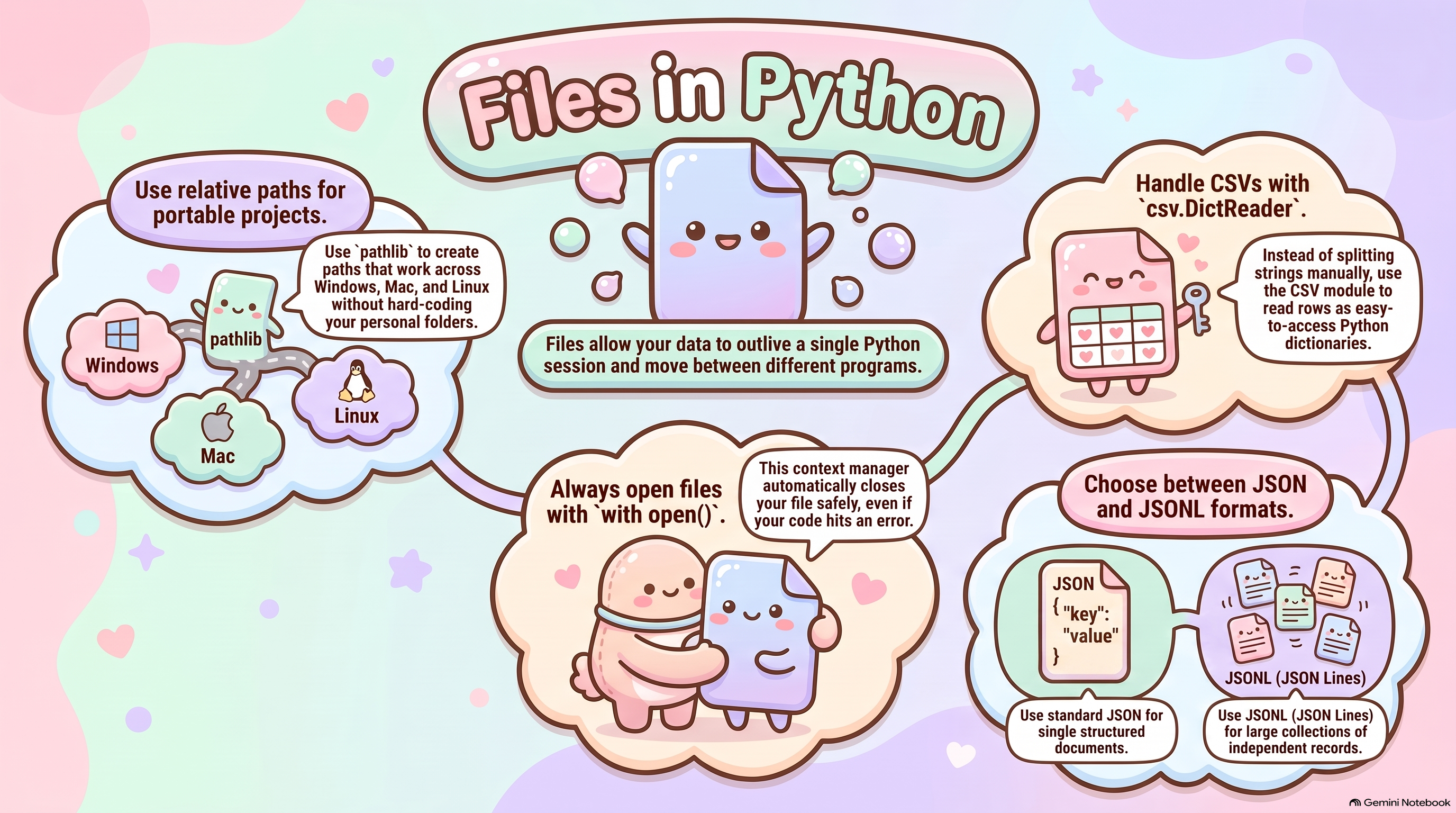
A file outlives the session that created it, which is what allows one program’s output to become another’s input. Safe file handling rests on a few habits: a with block that closes the file whatever happens, an explicit UTF-8 encoding, input and output locations that are named rather than assumed, and a read-back of anything written. Which format to write in depends on the shape of the data. CSV suits simple rectangular tables and moves easily between spreadsheets and programs, at the cost of careful handling of headers, quoting, embedded commas, missing fields, and the conversion of every value from text. JSON carries structured documents — nested objects and lists, numbers, booleans, and null — which makes it a fit for configuration, metadata, API payloads, and records that are not flat. JSONL puts one complete JSON record on each line, so large collections of independent records such as logs, events, and model outputs can be appended and processed one record at a time.
Code becomes reusable once it is divided along its responsibilities — reading, validating, transforming, analyzing, writing — and those functions are gathered into modules that other programs import. A script needs one explicit entry point: a main() function behind an if __name__ == "__main__": guard, so the same file can be imported without side effects or run directly from the terminal. What these conventions share is that they make a program’s inputs, assumptions, transformations, outputs, and execution steps visible rather than implicit, which is what allows an analysis to be repeated and checked by someone other than its author.
Listen
| Speaker | Text |
|---|---|
| Alex | Welcome to your custom deep dive. Today we’re doing a brief, uh, high level overview of your upcoming session, which is Topic of 5, covering files, modules, scripts, CSV, JSON, and JSON. Yeah, |
| Sam | and the mission here is really just to give you a primer based entirely on your course notes. You know, you’ll definitely want to review the full class notes after this, and uh Actually try out those Jupiter notebooks yourself to really lock in these coding habits, |
| Alex | right, because today’s goal is all about taking that messy temporary code and transforming into like a professional reproducible data science workflow. I mean, Jupiter notebooks feel like absolute magic when you’re first learning. Oh, absolutely, |
| Sam | it’s immediate gratification. You’re on a cell and boom, there’s your chart. Exactly. |
| Alex | But eventually you hit that dark side. The hidden states and the scrambled execution orders, |
| Sam | yeah, making true reproducibility basically impossible. The real problem isn’t the code itself, you know, it’s the memory, the hidden state. Wait, |
| Alex | so if I delete a line that defines a variable, that variable just stays in the memory. Like a ghost. |
| Sam | Exactly. It secretly lives there until you restart the whole kernel. It gives you this dangerous illusion that your code is perfectly fine. |
| Alex | Oh, so I hand the notebook to a coworker. They run it and it just instantly crashes, right, |
| Sam | because their fresh session doesn’t have your ghost variable. So |
| Alex | a notebook is basically an edge of sketch. It’s great for a creative sandbox, but scripts and data files are. I guess the actual concrete foundation of the house. That’s |
| Sam | a perfect way to put it. Files give you persistence. They actually outlive your temporary Python session. But, uh, when you start saving files, you immediately hit the pathing problem. |
| Alex | Ah, the classic, it works on my machine defense. |
| Sam | Exactly, because someone hard coded their specific C drive into the script, you really need relative paths instead. Those tell the computer to look for files starting right from the current working directory, |
| Alex | which makes the whole project shareable, and the notes mention this with open statement for opening files. Why do we need a safety net just to open a file? |
| Sam | Well, you can just manually close a file, but what if your code crashes before it gets to that close command? The file stays locked open. Oh |
| Alex | well. And that can corrupt the data, right? Yeah, |
| Sam | exactly. So the width block creates a temporary context. The moment your code steps outside that block, Python automatically closes the file for you, even if a massive error just happened. OK, |
| Alex | makes sense. So we have a solid foundation now. But how do we actually store the data? I know CSV is the go to for flat tabular stuff like a spreadsheet, right? |
| Sam | But CSV is terrible for nested data. Try putting a student record with a sub dictionary of emergency contacts into a flat spreadsheet. It just gets |
| Alex | mangled. Yeah, that sounds like a nightmare. So that’s where JSON comes in, right, because it handles complex nested data like. API outputs. |
| Sam | Precisely. JSON maps directly to Python dictionaries and lists. |
| Alex | But wait, if JSON loads everything into one giant array, won’t a massive data set just completely crash my computer’s memory? |
| Sam | Standard JSON will do exactly that, yes, it has to load the entire structure into RAM at once. |
| Alex | Yikes. So what’s the fix for that? |
| Sam | That’s why your notes introduce JSON or JSON lines. Basically, every single line is a separate independent JSON object. No giant enclosing brackets. |
| Alex | Oh, I see. So you can just stream it. |
| Sam | Exactly. Python reads line one, processes it, throws it out of memory, and moves to line two. You can process massive data sets record by record this way. It’s perfect for logs or LLM pipelines. |
| Alex | That’s amazing. OK, so we’ve tamed the data. But what about organizing the code itself? How do we escape the notebook trap |
| Sam | there? By using modules and scripts. A module is basically just a reusable chunk of code. Breaking your code into functions like having a separate file for raw data versus processed output makes troubleshooting so much easier, right? But wait, |
| Alex | if I have a module that I want to use as a library, How does Python know not to run the whole thing? Like if there’s test code at the bottom, |
| Sam | that’s where the entry point comes in. The if name it means main. guard. |
| Alex | Oh, the bouncer, checking the VIP |
| Sam | list. Exactly. It lets a single Python file act as both a reusable module you can safely import and a standalone script you can run directly from the terminal. |
| Alex | It’s like a 2 for 1 deal. So to quickly wrap this up, professional data science really requires explicit inputs, clear paths. And reproducible execution, right? |
| Sam | And I highly recommend using this overview as a jumping off point. Dive into those class notes and get your hands dirty with the Jupiter notebooks to truly master this workflow. Yes, |
| Alex | definitely try them out. It makes all the difference. And that leaves us with one final thought for you to mull over. If human exploratory notebooks are fundamentally plagued by these hidden states and out of order executions, could an AI agent? Ever effectively replicate a data scientist’s messy sandbox process? Hmm, that’s |
| Sam | a fascinating |
| Alex | question, right? Or will AI coding tools always be forced to rely strictly on these rigid reproducible file structures to even function at all? Maybe the messy sandbox is a uniquely human step before we pour the concrete. |
| Speaker | Text |
|---|---|
| Alex | Picture this. It’s a 3.0 a.m. |
| Sam | Oh no, I already know where this is going, right? |
| Alex | You are nine hours into fine tuning a massive model or maybe running a really heavy analysis. You’ve had your Jupiter notebook open all day. The progress bar is sitting right at 99%, and you are literally just waiting to write those final results to your disk, just holding your breath, exactly. And then out of nowhere, your kernel suddenly dies. Brutal. The memory is wiped. The environment just resets. The data is completely gone, and |
| Sam | you just want to throw your laptop out the window. Oh, absolutely. |
| Alex | So if that scenario makes your stomachs drop, or you know, if it has already happened to you this semester, it is time to stop treating your code like a scratch pad. Welcome to today’s deep dive. We are speaking directly to you, the data science graduate student. And our mission today is really about pulling you out of that fragile exploratory notebook phase, right? Get |
| Sam | out of the sandbox, yeah, |
| Alex | and moving you into building robust, repeatable, and, well, professional Python workflows |
| Sam | because honestly, It is arguably the most important transition you’ll make before leaving academia for |
| Alex | sure. And today we’re pulling insights directly from your course notes on Python file handling, data formats, and modular programming, |
| Sam | which is such a critical foundation. |
| Alex | It is. I mean, working purely in a temporary notebook is basically like building a gorgeous house of cards on a completely wobbly table. Today we’re pouring a concrete foundation. |
| Sam | I love that analogy, and framing it around that 3.0 a.m. panic is perfect because, you know, Writing code that works exactly once while you meticulously run cells in a very specific order, that’s what we call the happy path, path, right? So writing code that survives a network timeout or handles 50 gigabytes of data without choking your machine and can be handed to a teammate who can just run it blindly from a terminal. That is engineering. |
| Alex | OK, so let’s diagnose the problem with this happy path first, because if I’m working in a notebook, I read in a data set, I manipulate it, and the data is just, you know, sitting there in memory. Yeah, it’s very convenient, right? The temptation is to just keep it all loaded in the notebook’s memory while I try out different transformations. Why is that such a dangerous habit to build? |
| Sam | Well, basically because you are relying on what we call hidden dependencies. And invisible state, invisible state, yeah, so when you work interactively in a notebook, you might run cell 3, right, then jump up and run cell 1, then maybe modify a variable down in cell 5, guilty as charged. We all do it, but your computer’s RAM is now holding a highly specific, totally temporary state that only exists because of that exact sequence of human actions. Oh, I see. If you restart the kernel, that state just vanishes. Or even more commonly, you commit that notebook to GitHub. A colleague pulls it down. They click run all from top to bottom, and it immediately throws an error |
| Alex | because the code in the file doesn’t actually reflect the chaotic order in which I originally ran it. |
| Sam | Precisely. They didn’t do the invisible dance you did to get the data into that shape. Moving your workflow to rely on actual files saved to a disk rather than temporary variables in memory, it forces you to create persistence, |
| Alex | persistence meaning it sticks |
| Sam | around exactly. A file on a disk outlives the Python session. It creates a hard, undeniable contract like script A produces this exact file, and script B requires this exact file to |
| Alex | start. OK, I totally understand the reproducibility argument there, but let me push back on this a little bit on behalf of the listener, because when we talk about how we actually process these files, the notes really emphasize reading and writing data sequentially, like records. By record rather than all at once. Yes, they do. But if I have a data set, isn’t it just infinitely faster to load the whole thing into memory at the start, do all my vectorized matrix math, and then just dump the final result to disk at the end? I mean, in theory, because memory is cheap now, right? If my laptop can’t handle it, I can just, you know, rent an EC2 instance on AWS with terabytes of RAM and just throw hardware at the problem. |
| Sam | Well, you could throw hardware at the problem, sure, up to a point. But it’s incredibly inefficient and honestly financially wasteful. Oh yeah. Let’s talk about the mechanics of memory overhead in Python first. If you have a raw CSV file that is, say, 10 gigabytes on your hard drive. Loading that into a panda’s data frame doesn’t just take 10 gigabytes of RAM. Oh, |
| Alex | right, because Python objects carry overhead, |
| Sam | massive overhead. A simple integer in Python isn’t just 4 bytes of memory like it is in C. It’s a full C structure with reference counts and type information and all that. So by the time you parse that 10 gigabyte file into a data frame, the metadata, the indices, and all that object overhead. Might bloat it to 30 or 40 gigabytes in RAM just to hold the data just to hold it. And if you’re doing complex merges or creating copies of the data for transformations, you’ll spike that even higher and then the whole thing crashes. Exactly, you’ll hit an out of memory error, an OM kill remarkably fast, even on a rented cloud instance scaling memory linear. with your data size is just a really great way to blow through a research budget. |
| Alex | OK, fair enough. So the sheer volume of data makes loading it all into memory basically cost prohibitive or just impossible. But what about that 3.0 a.m. crash scenario we started |
| Sam | with, right? That is the second major reason we process sequentially, long running processes. |
| Alex | OK, |
| Sam | walk |
| Alex | me |
| Sam | through that. Let’s say you aren’t just doing simple math. Let’s say you’re passing a massive data set of prompts through an LLM API to evaluate its responses, |
| Alex | which everyone is doing right now, right? |
| Sam | And that involves network requests. It is computationally expensive and painfully slow. It might take you 10 hours to process the whole batch. |
| Alex | And if I’m holding all those API responses in a giant list in memory, just waiting for the 10 hour mark to finally call the save function, if the power |
| Sam | blinks at hour 9. Or the API rate limits you and the script crashes. The operating system reclaims the memory. Python’s garbage collector sweeps it all away. You just lost 9 hours of paid API calls and compute time. That hurts to even think about. It does, but if your architecture reads one prompt, calls the API. And instantly appends that single result to a file on your disk before moving to the next prompt, you’re protected. Ah, because it’s already saved. Exactly. If it crashes at hour 9, you have 90% of your finished data sitting safely on the hard drive. You just write a tiny script to find the last process line and resume the job from there. I get that. But |
| Alex | wait, let’s pause there for a second, because isn’t disc IO, like physically writing to a hard drive, famously the slowest bottleneck in computing? It definitely can be. So if I’m opening a file and saving to disc 10,000 times in a loop, isn’t that going to absolutely tank my script’s performance? |
| Sam | That is a great engineering question. It would tank performance if Python was literally spinning up the physical disk drive to write every single byte in real time, right? But that’s not how modern operating systems handle file IO. When you stream data to a file, the operating system uses a memory buffer. A buffer, yeah, it holds a chunk of your output in RAM and only actually flushes it to the physical disk when the buffer gets full, or when you explicitly close the file. Oh, |
| Alex | OK, so the OS is secretly batching it for us under the hood. |
| Sam | Exactly. So you get the safety of sequential processing without the severe. Performance penalty of constant physical disc rights. |
| Alex | That makes a ton of sense. OK, so we’ve established that saving to disk sequentially is vital. We want to process a chunk, let the buffer handle the right, and move on. But that directly impacts how we format the data container itself, doesn’t it? |
| Sam | Completely. When you decide to stream data rather than load it monolithically. The file format you choose dictates how painful that process will be, |
| Alex | right? So the course notes start with CSVs, and look, as grad students, we all know CSVs. We all love them |
| Sam | until |
| Alex | we |
| Sam | don’t. |
| Alex | Exactly. But let’s skip the basic comma separated definition. Why do CSVs start falling apart when we scale up to really complex data science tasks? |
| Sam | Well, because CSVs are inherently flat, and modern data is rarely flat. If you are dealing with basic numerical features like age, height, weight, CSVs are wonderfully efficient. But the moment you introduce nested relationships or unstructured text. CSVs become a huge liability. How so? Imagine you were working with NLP and one of your columns contains raw tokenized text, or worse, an array of floating point vector embeddings. |
| Alex | Oh, right, because trying to serialize a list of 1000 vector floats into a single CSV cell means you’re storing it as a giant string with its own internal commas. |
| Sam | Exactly. And when you try to parse that back out, unless your CSV parser is perfectly configured to respect the characters around. Specific cell, |
| Alex | it’s going to see those internal commas and just assume they’re column dividers, |
| Sam | and suddenly your row has 1000 extra columns. The data shifts and your entire pipeline throws a fatal shape error, |
| Alex | which turns into a total rejects nightmare trying to patch it. |
| Sam | It really does, |
| Alex | which naturally leads us to JSON, I assume, JavaScript object notation, because it inherently understands nested data, right? Like lists within dictionaries, dictionaries within lists. |
| Sam | It maps perfectly to Python’s native data structures, |
| Alex | yeah, and it handles all the quoting and escaping automatically. It does. |
| Sam | But standard JSON has a massive mechanical flaw if we are trying to stream big data. OK, |
| Alex | walk us through the mechanics of that flaw, because if I just use like JO.load on a 5 gigabyte JSON file, it’s going to crash my RAM just like a CSV would, right? Worse, |
| Sam | actually, yeah. When you have a collection of records in a standard JSON file, it is formatted as one giant array. So there is a single opening square bracket at the very first byte of the file and a single closing bracket at the very last byte with commas between every record in the middle. Ah, |
| Alex | so it’s essentially one singular object, |
| Sam | exactly. And because it’s one single object, a standard Jason parser cannot just read the first record and yield it to you. The parser has to read the entire file. And build an abstract syntax tree or AST in memory. He has to validate that every single curly brace has a matching closing brace. And it has to verify that the final closing bracket exists at the end of the file. |
| Alex | Oh wow. So it has to read everything before it does anything. |
| Sam | Only after it has parsed the entire 5 gigabyte structure in RAM will it actually hand you back a Python dictionary. |
| Alex | So the validation process itself is what spikes the memory overhead. It basically refuses to let you see line one until it has checked line 1 million. |
| Sam | Yes. And appending to a standard JSON file is just as bad. I can imagine you can’t just write a new record to the end of the file. Mechanically, you would have to seek to the end. Delete that final closing bracket. Add a comma, insert your new JSON object, and then write a new closing bracket. That sounds horrible. It is completely impractical for continuous logging or the 3.0 a.m. crash protection we just talked about, |
| Alex | which brings us to the actual solution for streaming complex data, right? JSON, Jason lines. |
| Sam | Yes, JO Lines is brilliantly pragmatic. It solves the structural problem by simply removing the array structure entirely. How does it work? The only rule of JSOM is this. Every single line in the text file must be a complete valid JSON object all by itself, separated by a standard new line character. OK, |
| Alex | so if a standard JSON file is like a I don’t know, a heavily bound encyclopedia where you have to pick up the entire heavy book to read one single entry, |
| Sam | right? And you can’t just rip a page out or shove a new one in. |
| Alex | Exactly. Then JSON is more like a stack of independent flashcards. |
| Sam | That is the perfect analogy. You can pick up one flashcard, parse the JSON on it, run your calculations, and then just throw it out of memory before you ever look at the next. Flash card |
| Alex | and because there’s no giant array holding it all together, there’s no AST validation overhead for the whole |
| Sam | file. Exactly. The parser only evaluates one line at a time. This completely bypasses the memory limit problem and for a pending data, you just drop a new flashcard on top of the stack. You write a new line character and you’re string IJON object done. |
| Alex | It’s so funny how the solution to big data crashing our complex parsers is basically just, you know, stripping away the punctuation and going back to reading things line by line like a 1980s mainframe. |
| Sam | Hey, sometimes the most robust engineering solutions are the simplest ones. And also consider the fault tolerance. What do you mean? In a standard 5 gigabyte JSON array, if a single quote mark is corrupted in the middle of the file, The entire document is invalid. The whole thing, yep, the parser will throw an error and refuse to load anything. Oh, that’s dangerous. But with Jason, if line 50,000 is corrupted. You just write a try except block to catch the parse error on that specific line, log a warning, and happily continue processing line 50,0001. |
| Alex | That is incredibly robust. OK, so we’ve fundamentally solved scaling our data, right? We use disk persistence to survive crashes, and we use JSON to stream complex structures without blowing up our memory. But as a project grows, the data isn’t the only thing that gets massive. The script itself. It’s huge. Moving everything out of a notebook into one monolithic 3000 line Python file sounds like a totally different kind of nightmare. |
| Sam | Oh, it absolutely is. A monolithic script is impossible to navigate, incredibly hard to version control with a team because of merge conflicts, and just very difficult to test. This is where we transition from scaling data to scaling code through decomposition and modules. |
| Alex | Let’s define that module concept for this workflow. Because the notes emphasize that a lot of what we do in data science relies on huge libraries of independent solutions written by other developers. |
| Sam | Right? When you type import pandas or import numpy, you are bringing in modules. A module is essentially just a separate Python file or a directory of files that encapsulates a specific set of tools. I mean, you don’t write your own C-based matrix multiplication algorithms, right? You import NMy because another expert already perfected it. |
| Alex | But the notes stress that we need to apply this to our own code too. |
| Sam | Yes, decomposition as you move from notebooks to production code, you shouldn’t just dump all your functions into one file. You break your code into separate logical files based on responsibility. So you might create a data cleaning.pi file that holds all your string manipulation functions, a feature engineering.pi file for your math, and an evaluate.pi file for your model scoring. It’s |
| Alex | like hiring specialized contractors for a construction project, right? Like you wouldn’t ask the electrician to do the plumbing, OK, but if I break my project into 5 different files and I’m importing functions from my own files into a main script, How do I prevent chaos? Chaos. Yeah, like if my teammate wrote a function called clean text in their module and I wrote one called Clean Text in mine and we import both, how does the interpreter not just spontaneously combust? |
| Sam | Oh, OK. This is where Python uses name spaces. Name spaces, yeah, namespace is essentially a directory system for your Variables and functions to prevent naming collisions. |
| Alex | I think of name spaces a bit like a hospital paging system. |
| Sam | OK, I like where this is going. |
| Alex | If you just page Dr. Smith on the intercom, you might get 3 different doctors answering, and chaos ensues. But if you page Dr. Smith in neurology versus Dr. Smith in cardiology, Everybody knows exactly who is needed. |
| Sam | That’s a really great way to visualize it. Under the hood, Python manages name spaces using dictionaries. When you import a module, say, import cleaning, Python creates a name space called cleaning. All the functions defined inside that file belong to that namespace. |
| Alex | So if you want your specific text function, you call cleaning. clean text. Exactly. |
| Sam | It acts as an unambiguous prefix. |
| Alex | So it tells the interpreter exactly which expert’s tools to grab without a collision. And again, we aren’t going to get bogged down in the specific syntax of relative versus absolute imports here. The exact mechanical syntax for linking these files together is detailed in your course notes. |
| Sam | Yes, the conceptual takeaway is what matters right now. You decompose your monolithic script into specialized files. And you use namespaces to keep their internal environments isolated and safe, |
| Alex | which brings us to the final hurdle. |
| Sam | Here we go. |
| Alex | I’ve got my data flowing via JSON. I’ve broken my monolithic code into beautiful namespace protected modules, but without a Jupiter interface where I can literally click the play button on a specific cell. Yeah, how does the computer actually know where to start if I have 5 different Python files in a folder, what kicks off the engine? This |
| Sam | is where we talk about the entry point and a very specific trap that almost everyone falls into when they first leave notebooks. Oh, the import trap. The import trap. OK, |
| Alex | tell us about this. |
| Sam | When you write import helper module in Python. The interpreter doesn’t just passively read the file and learn the function. doesn’t. No, mechanically, Python actually executes the top level code of that file from top to bottom in order to build the module object and load it into its cache. |
| Alex | Wait, so if I have a module where I defined a bunch of helpful data cleaning functions, but at the very bottom of that file, I left a few lines of code where I was like testing the functions on a 10 gigabyte data set. |
| Sam | If you import that file into another script just to borrow one function, Python will execute that test code during the import. Are you serious? Very serious. You will accidentally trigger a massive memory crushing data job just by typing import. |
| Alex | Oh, that’s brutal. So importing a script without safety rails is basically like trying to open a manual to read about a missile and accidentally hitting the launch button. That is. |
| Sam | Exactly what happens to prevent this, Python gives us a built-in structural safety switch, usually referred to as the main guard. |
| Alex | OK, how does that work? |
| Sam | It relies on a special hitter variable that Python automatically creates called |
| Alex | name. Oh, name with the double underscores, the dunder name. |
| Sam | Right? When Python runs a file, it assigns a string to that name variable. If you run the file directly, meaning this is the file you told Python to execute it. Sets the variable to the string main. But if the file is merely being imported by another script, Python sets the name variable to the actual file name of the module. |
| Alex | OK, so the file inherently knows whether it is the start of the show or just the supporting actor. |
| Sam | Exactly. So at the bottom of your scripts you put an if statement, if name, main. Ah, I’ve seen that everywhere, right? And all your execution code. The code that actually loads the data set and kicks off the pipeline goes indented under that if |
| Alex | block. So if the file is just being imported, that if statement evaluates to false, and the execution code gets safely ignored. The functions get defined, but the missile doesn’t launch. Yes, |
| Sam | it allows a single Python file to serve dual purposes. It can be a passive reusable library of functions if imported elsewhere, but it can also act as a standalone executable script if you run it directly. |
| Alex | And getting to that point, having a script you can run directly is really the holy grail of this entire transition, right? Terminal execution. |
| Sam | It is the defining mark of a production ready workflow. A professional data pipeline shouldn’t require a human to boot up a browser, start a Jupiter server, open a specific file, and manually click cells in the hope they don’t mess up the hidden state, |
| Alex | because humans are notoriously bad at doing the exact same sequence of clicks twice. |
| Sam | Exactly. With the clean modular project and a clear entry point protected by a main guard, you can run your entire workflow straight from your command line terminal. You just type Python processdata.pi, |
| Alex | and the machine just takes over. Yes. |
| Sam | It reads the inputs, imports to specialized modules without triggering accidental side effects, streams a massive JSOal data line by line utilizing the OS buffers, and writes the output safely to disk. That is so clean. And because it runs from a single command, it is fully reproducible. A teammate can clone your repository and run that one command to get your exact results, which is huge for collaboration. Oh, massive. And more importantly, it unlocks automation. You can write a bash script to run it. You can set up a cron job to schedule it to run every night at 2 a.m. while you are asleep instead of being awake in a panic. Exactly. You can integrate it into a CICD pipeline where it runs automatically every time new data arrives. You simply cannot do that with an exploratory notebook. It really is |
| Alex | a massive shift in how you think about your work. We started this deep dive looking at the fragility of notebooks, right? Like that anxiety inducing state where a kernel restart destroys 9 hours of work. And we’ve diagnosed exactly how to replace it with an engineered foundation. We use file persistence and sequential disk rights to survive the inevitable crashes of long-running API calls, which |
| Sam | is going to save you so much time. |
| Alex | And we’ve bypassed the massive memory overhead of Python and standard JSON validation by streaming our complex nested data with JSON. |
| Sam | And we’ve tackled the code bloat by using decomposition, leaning on name spaces to organize our specialized modules. And implementing that crucial main guard to ensure all imports are safe. |
| Alex | It really does mark the boundary between, you know, an academic who writes code just to get an answer and an engineer whose code can be trusted, scaled, and deployed in the real world. |
| Sam | It’s a steep learning curve, I won’t lie. But once you set up your first modular pipeline and watch it churn through 50 gigabytes of data flawlessly from the terminal, you’ll never want to go back to a messy notebook for production work. |
| Alex | I completely agree. So as you head back to your IDs and start refactoring those notebooks today, I want to leave you with one final thought to ponder. We figured out how to handle data sets that are too big for your computer’s RAM by streaming them line by line from your local disk. But what happens to your module structure and your processing logic when a data set gets so astronomically large that it doesn’t even fit on a single computer’s hard drive? Oh man, when you have to stream data across a distributed cluster of 100 different machines working in parallel, now |
| Sam | that pushes you out of standard Python entirely and into the realm of distributed computing architectures. |
| Alex | Something to think about as you build that concrete foundation today. Thanks for joining us on this deep dive, and we’ll catch you next time. |
Read
- Reading and Writing Files (source document for podcast )
- Python Modules and Self-Standing Scripts (source document for podcast )
- Wes McKinney: Python for Data Analysis: Chapter 3
Hands-on
Notebooks in 05-Files-Modules-Scripts